

· By LumionVietnam
3ds Max 2027.2 is more than a maintenance release for architectural visualization. Its most relevant change is support for 3D Gaussian Splats (3DGS), alongside a new Points data toolset and render-time Point Instance modifier. Together, they make it easier to combine a captured site or landscape with clean, editable architectural geometry—and to populate large scenes without treating every repeated asset as a unique mesh.
The short version: test 2027.2 if your work combines real-world context, dense planting, or Arnold. Do not treat a Gaussian Splat as a substitute for survey-grade BIM geometry, and do not upgrade a production pipeline before checking renderers, plug-ins, and file exchange.

What changed in 3ds Max 2027.2?
Autodesk lists four headline areas: Gaussian Splat support, a new Points object type, true instancing through Point Instance, and Smart Bevel improvements. 3ds Max 2027.2 also ships with Arnold for 3ds Max (MAXtoA) 5.9.3.0 and USD for 3ds Max 0.16.2. The release’s color-management update adds ICC profiles for displays and improves how missing configuration files are handled.
1. Bring captured context into a scene as 3DGS
3DGS represents a captured scene as millions of oriented, colored, semi-transparent Gaussian points rather than a conventional triangle mesh. Autodesk says 3ds Max 2027.2 can import PLY, SPZ, and LCC data and combine it with polygon meshes and splines. In a visualization project, that offers a practical way to place an existing street, courtyard, or tree canopy behind a proposed building without manually modeling every background detail.
It is a context layer, not automatically editable architecture. A captured splat preserves the recorded appearance and may include baked lighting, occlusion, or capture artifacts. Keep the proposal’s envelope, dimensions, material decisions, and anything that must be revised as conventional geometry. This division—captured context behind, design intent in front—is an editorial workflow recommendation, not an Autodesk rule.
2. Use the new Points workflow selectively
The new Points object type and modifiers let you select and manipulate point data, turn object vertices or surfaces into points, and use point distributions as input for other operations. Autodesk documents formats and object types separately: a 3DGS object can be used by Point Instance, but the Point Instance modifier does not support Point Cloud objects or particle data. That distinction matters if your existing scene already uses point-cloud or particle systems.

3. Build dense repeated scenes with Point Instance
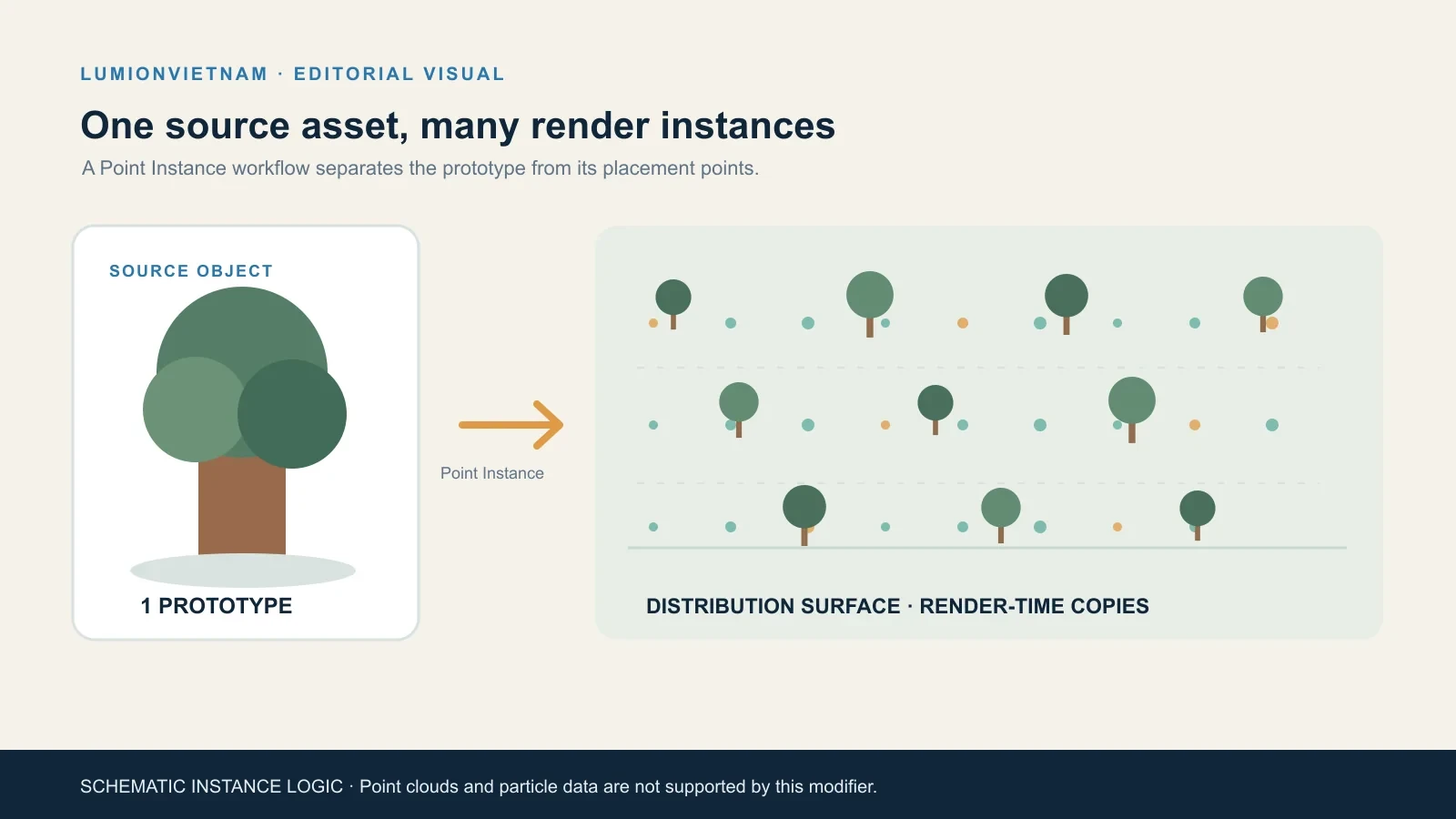
Point Instance references source objects and places render-time instances at points on a modified object. The approach is useful for a landscape band of trees, repeated street furniture, or a large field of low-priority background assets. Autodesk’s own example starts with a tree asset, converts a distribution surface with Turn to Point, and adds Point Instance. The viewport can show bounding-box proxies while Arnold renders the instances.
The benefit is scene organization and memory-efficient repetition—not a promise that every scene or render will become faster. Source assets still need sensible polygon counts, materials, scale, and naming. Check the distribution, randomness, visibility, and final camera before raising the count.
4. Smart Bevel is more dependable on dense meshes
Smart Bevel’s 2027.2 improvements target output quality, speed, and reliability, especially with dense meshes. Autodesk reports results processed up to 20 times faster with 22 times less memory consumption in its documented conditions. Treat those numbers as Autodesk’s specific Smart Bevel comparison—not a general speed-up for 3ds Max. For architectural modelers, this is most relevant when refining Boolean-heavy furniture, façade details, or hard-surface components that previously needed manual cleanup.
The release also adds USD asset-path diagnostics. A new Path Editor can surface unresolved paths and let you preview the number of affected paths before applying edits. This is a pipeline-quality-of-life improvement for teams exchanging referenced scenes; it does not repair every external asset automatically.
Why Arnold 5.9.3 matters to ArchViz
MAXtoA 5.9.3 supports rendering 3DGS scenes and working with the new point data. Its updated noice denoiser is intended to reduce over-blurring and occasional black-pixel artifacts; the former variance setting is now called filter_strength, while the old name remains accepted. Autodesk also reports GPU scene-update improvements of up to 43% for interactive mesh edits. That figure describes scene updates in the documented tests—not a 43% reduction in final render time.
For non-photorealistic output, the new tone_zones node can split lighting into up to eight brightness bands. shader_to_rgba gives a shading network direct and indirect illumination outputs; Autodesk notes that the indirect output is not yet available on GPU. If your studio only produces photorealistic stills, these NPR nodes may not change the daily workflow. If you create diagrammatic views, competition graphics, or stylized sequences, they are worth a small test scene.
A safe first test: four checks before using it on a live project
- Make a copy. Save a versioned copy of a representative scene and record its current renderer, plug-ins, output camera, and render settings.
- Import one context asset. Use
File > Import > Import…, choose a PLY, SPZ, or LCC file, and set the file type to All Formats if it does not appear. Confirm the correct preset and up-axis before accepting. - Align to a known reference. Compare one measurable point or axis with the architectural model. Do not judge alignment from a single attractive perspective.
- Render a fixed camera twice. Compare the prior version and 2027.2 at the same resolution, renderer, exposure, and sample settings. Check edges, transparency, denoising, memory use, and whether teammates can reopen the scene.

What can break or disappoint?
- Viewports and final output are not the same test. Autodesk notes that one file-based Gaussian Splat object has no viewport representation; use the documented renderer workflow to verify final output.
- Captured appearance is not a measured model. Use drawings or survey/BIM data for dimensions, documentation, and design decisions.
- Not every point source is an instancing source. Point Cloud objects and particle data are explicitly excluded from Point Instance.
- Plug-ins and exchange need a pilot. Test scene open/save, render nodes, material conversion, scripts, and farm availability before standardizing on 2027.2.
- Arnold GPU has separate requirements. Confirm GPU architecture and driver support against the Arnold release notes; do not infer support from the 3ds Max version alone.
Should an architectural team upgrade?
For a team working with existing-site captures, detailed landscape context, or repeated objects, 2027.2 offers a meaningful feature set to evaluate. For a stable project already in production, the safer choice is to test a copy first and upgrade between milestones. If the new features are not relevant to your current scenes, you can wait for plug-in and pipeline validation rather than updating just to chase a version number.
If you coordinate visualization with a BIM model, our Revit 2027 graphics guide explains a separate part of the model-review pipeline. Keep the BIM model as the source of dimensions and design intent; use captured context and instanced assets to support the visual story.
FAQ
Which 3DGS files can 3ds Max 2027.2 import?
Autodesk documents PLY, SPZ, and LCC import. The import options differ by file type, so confirm the preset and up-axis before using the capture in a project.
Does Gaussian Splatting replace a polygon model?
No. It is a point-based representation suited to captured visual context. Keep measurable, editable design geometry as conventional model data unless a specific downstream workflow supports another representation.
Can Point Instance use particle systems?
No. Autodesk explicitly says Point Instance does not support Point Cloud objects or particle data. Verify the object type before rebuilding a distribution workflow.
Official sources
Continue Exploring